
Official
Product support, identity rules, payments and ticketing are confirmed against government or product sources.
A visual, source-checked guide to paying, chatting, riding, navigating, booking trains and ordering food in mainland China.
Product support, identity rules, payments and ticketing are confirmed against government or product sources.
Reddit experiences identify recurring friction. They are useful context, never a guarantee.
Google-discovered articles add practical steps only when official information does not cover the experience.
Finish registration while your normal SIM, bank and email are easy to reach.
Install only official app listings and check the developer name.
Keep international SMS and roaming available for verification.
Use your passport name exactly—do not translate or shorten it.
Add two cards and tell your bank you will use them in China.
Save your hotel's Chinese name, address and telephone number.
Carry the physical passport used for every booking.
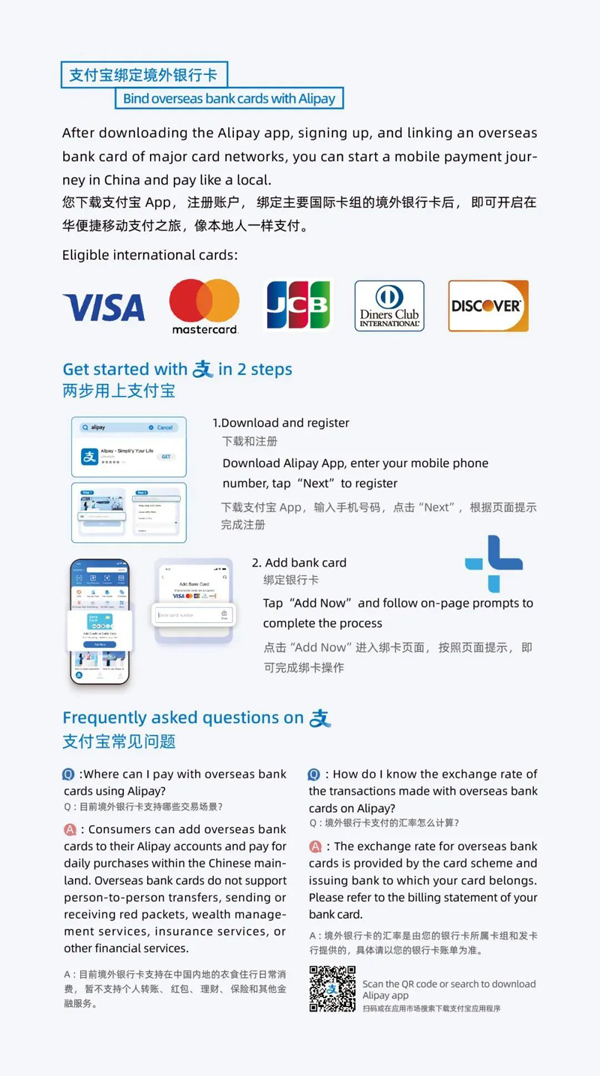
The easiest first payment app for most short-term visitors. Set it up before departure and keep another card or payment method as backup.
Choose the correct country code and keep international SMS enabled until verification is complete.
Enter your name exactly as printed in the passport. Do not translate, shorten or rearrange it.
Open Me → Bank Cards → Add. Your issuing bank may still decline an individual transaction.
Tap Scan, check the merchant name and amount, then confirm securely.
Open Pay/Receive and show the live code. Never send anyone a screenshot of this code.
Choose Transport, select the correct city, then activate its metro or bus code.
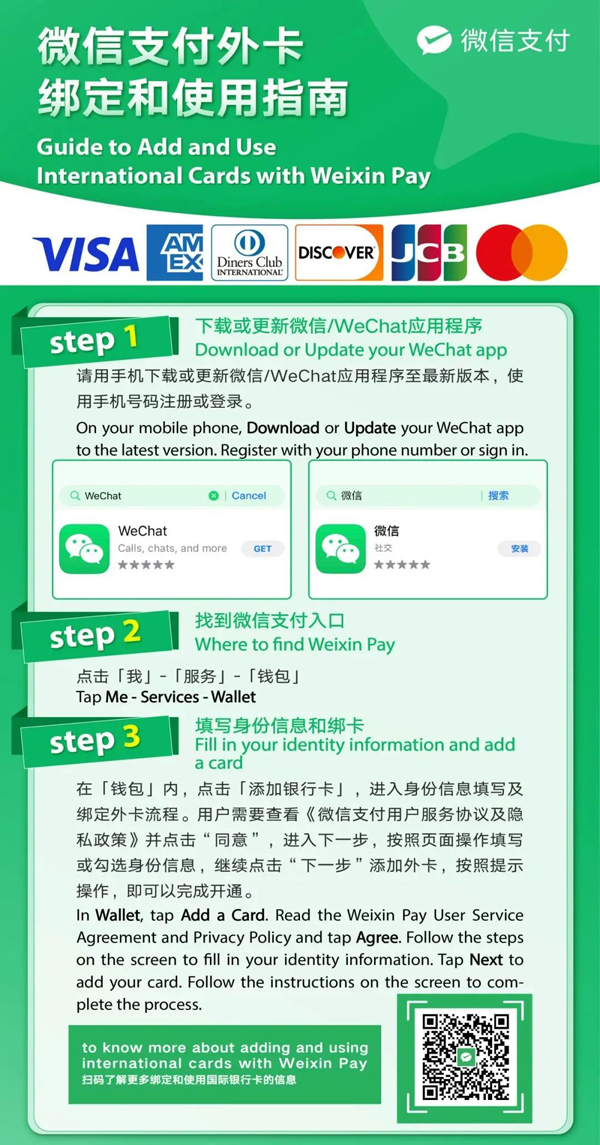
Your communication app and a useful backup wallet. Hotels, guides and local services often use WeChat messages or mini programs.
Register with your own phone number. If the app requests security assistance, follow its official flow and never pay a stranger.
Go to Me → Services → Wallet → Cards. Labels can vary slightly by account region.
Complete the identity fields and follow the issuing bank's confirmation prompts.
Use Me → Services → Money, or open Scan from the top-right menu.
Press and hold a Chinese message, then choose Translate.
Open the … menu and choose Translate when available. Recheck prices, quantities and addresses.
The most straightforward ride-hailing option for many international visitors, with an English interface, overseas-number registration and translated messaging.
Use the official DiDi China listing, not an unrelated regional app.
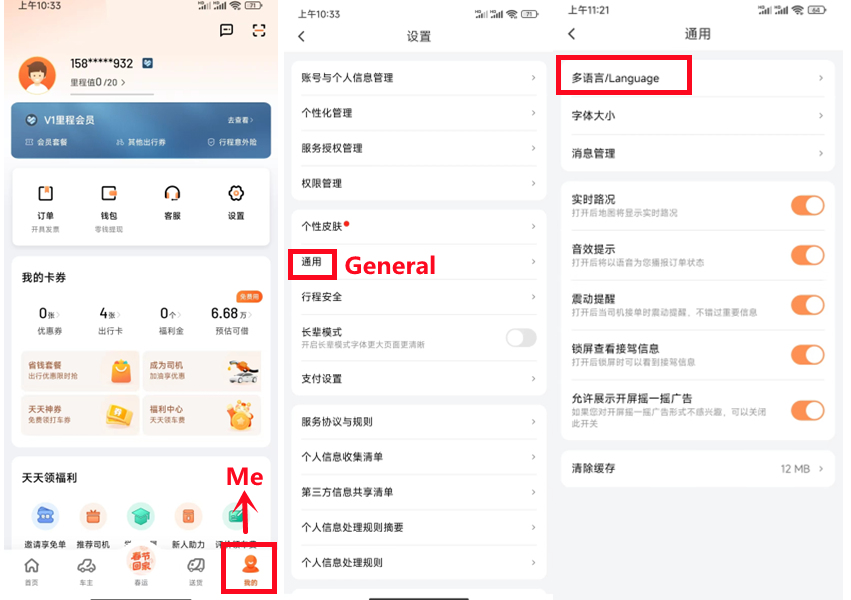
Open Me → Settings → General → Language → English. Available ride categories may change after switching.
Add an international card or an available mobile wallet, and allow location while using the app.
Search the Chinese name if possible and check the city, branch and map pin.
At airports, stations and malls, follow the designated ride-hailing pickup-zone signs.
Confirm the licence plate, car colour and driver information. Follow the route in the app.
A China-focused map with multilingual place information, walking, cycling, transit and driving routes.
Use the official listing. The multilingual version supports English and a growing list of other languages.
Grant location access while using the app so the walking start point and pickup pins are accurate.
Save the exact branch, Chinese address and phone number before going offline.
Compare the city, district, photos and nearby streets—not only the translated name.
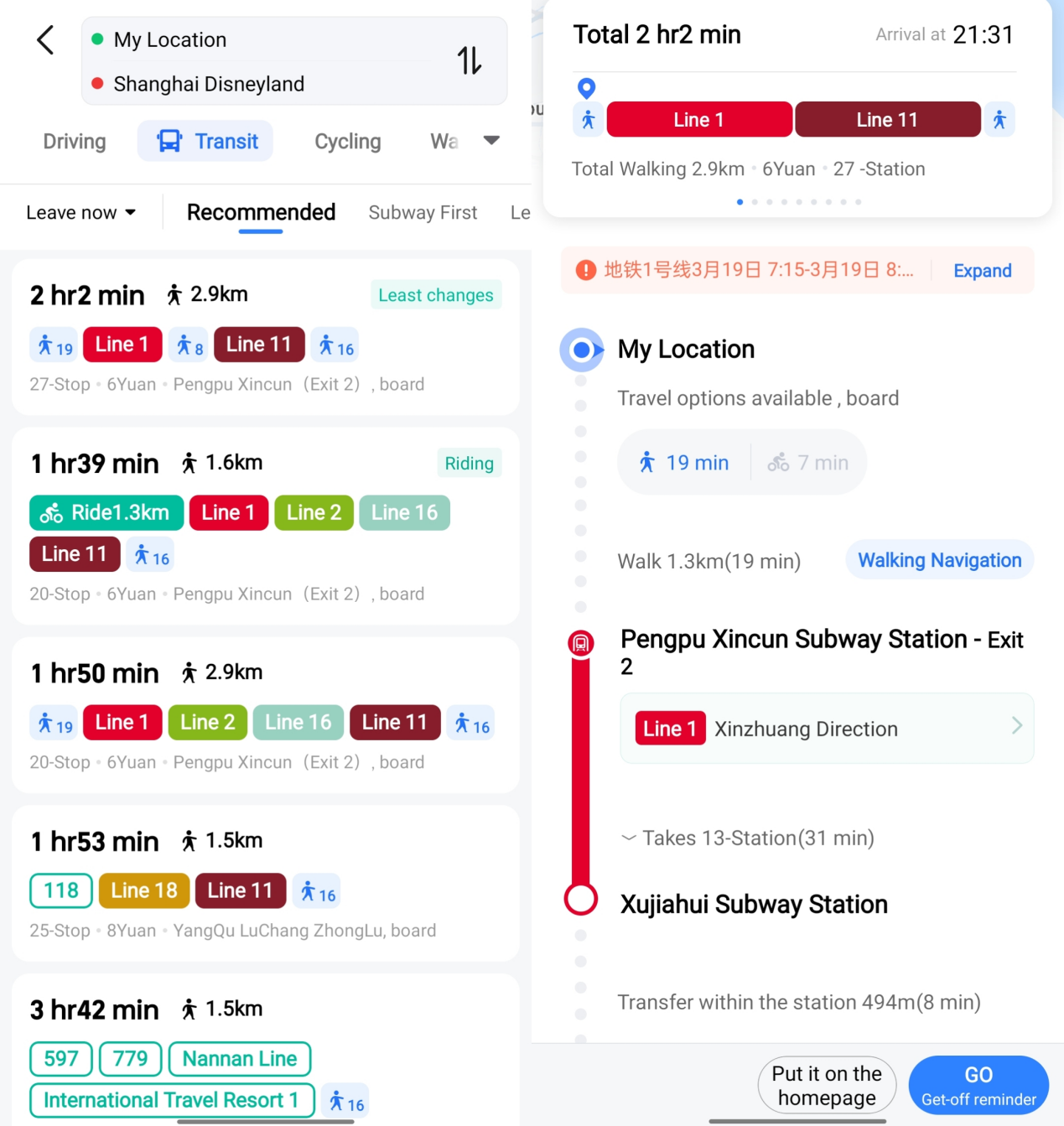
Open Route and select walking, transit, cycling or driving. Note the metro exit number.
Large attractions and stations have several gates. Navigate to the visitor entrance, not the area centre.
The simplest multilingual booking option for many visitors. It accepts passport details and international payment methods, with 24/7 customer support.
Choose Passport and enter surname, given names, document number, nationality and expiry exactly.
The official listing supports multiple card and wallet options; availability depends on your region.
A submitted train request is not final until its status shows confirmed and ticketed.
Do not rely on pinyin alone. Before paying, check the Chinese characters, province or city, and full station name. For example, Jiangsu's 苏州 and Anhui's 宿州 may both appear as ‘Suzhou’ when tone marks are omitted.
Check service fees, cancellation rules and whether a hotel accepts international guests.
Save the Chinese hotel address or train number, carriage and seat. Carry the physical booking passport.
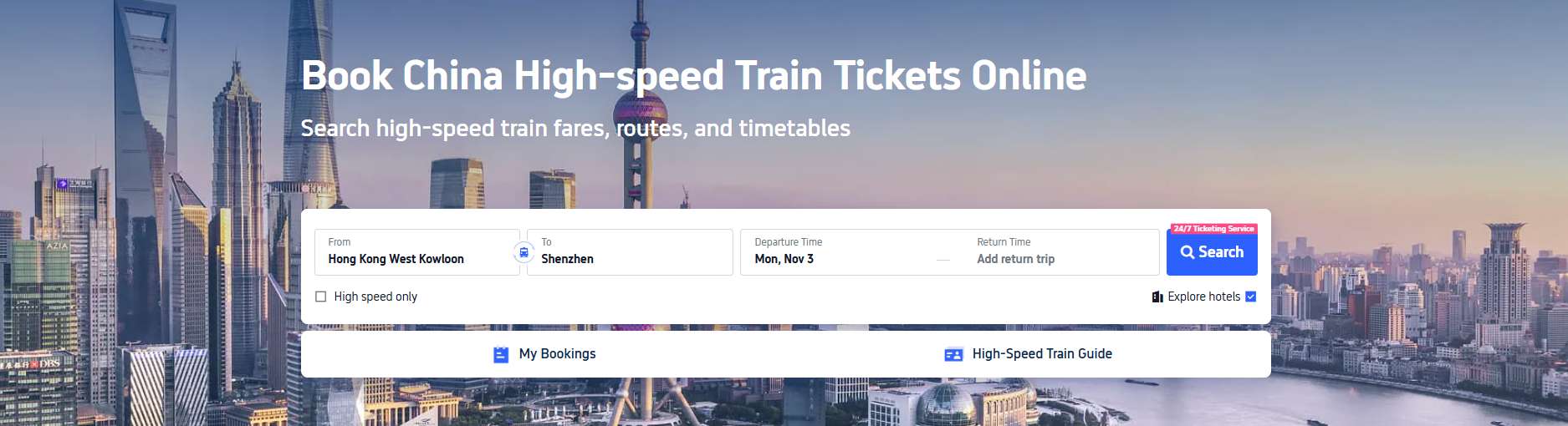
China Railway's official platform. It offers direct ticket availability and usually avoids third-party service fees, but passport verification needs preparation.
Check the developer carefully. Similar third-party apps can use 12306 in their names.
Fill in the name, nationality, passport number and expiry exactly as requested.
Upload a clear passport information page if requested. If online verification fails, use a staffed station window.
Do not rely on pinyin alone. Before paying, check the Chinese characters, province or city, and full station name. For example, Jiangsu's 苏州 and Anhui's 宿州 may both appear as ‘Suzhou’ when tone marks are omitted.
Save the train number, carriage and seat after payment.
Use a passport-enabled gate or the staffed manual channel marked 人工通道.
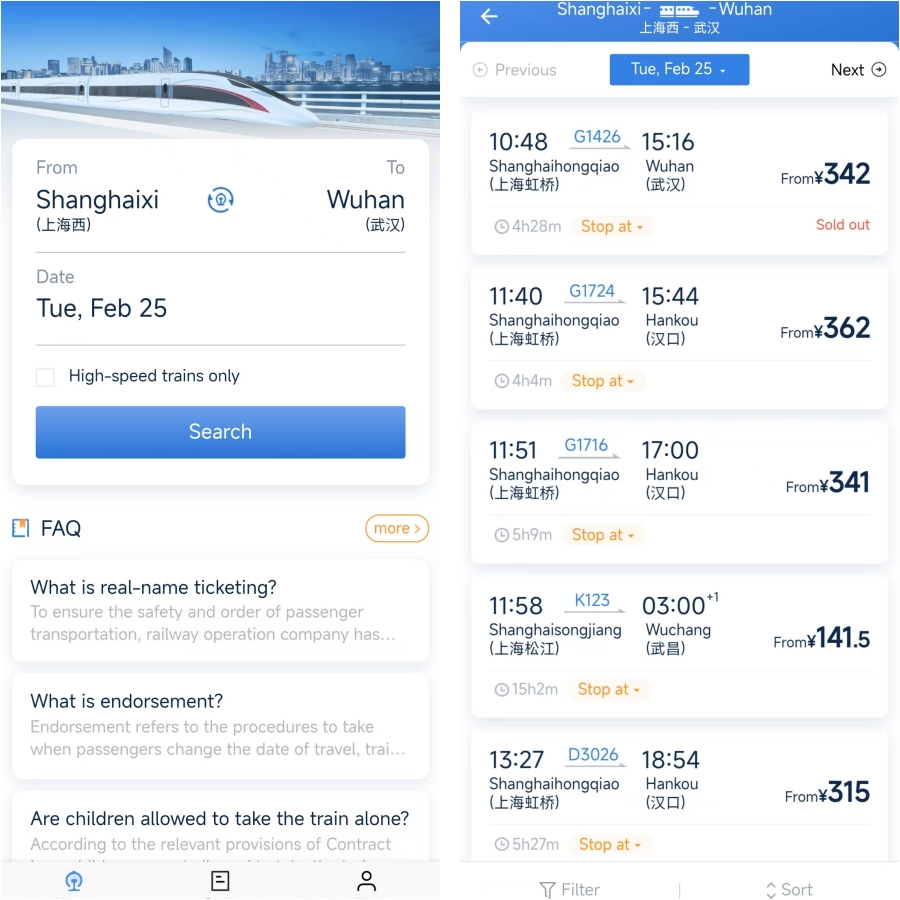
Mainland China's delivery apps are still mostly Chinese. The most practical visitor workflow is through Alipay or WeChat mini programs with built-in translation.
Search 美团 or 淘宝闪购. Mini-program availability and labels can vary by city and account.
Open the … menu and choose Translate. Treat translated ingredients and allergy information cautiously.
Use the hotel's Chinese address, building, lobby instructions and a reachable phone number.
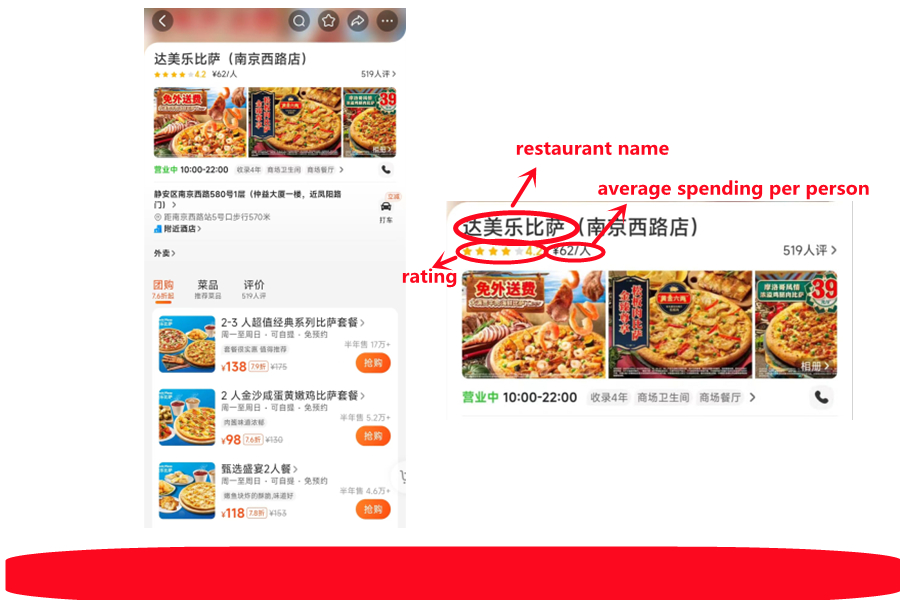
Look at the restaurant name, rating, recent order volume, delivery time and minimum order.
Confirm size, quantity, spice level, extras, cutlery and the final address before payment.
Write: 我不会说中文,请发文字消息。请放在酒店前台或外卖柜,谢谢。
Both ultimately depend on China Railway ticket availability. No platform can guarantee a sold-out seat.
Check the country code, enable roaming, turn off SMS filtering and retry on a trusted network.
Approve the transaction with the issuing bank, try a second card, then use the other wallet or RMB cash.
Recheck name order and image clarity. For rail, try the English website or a staffed station window.
Search the Chinese name and verify the city, district, branch, photos and entrance.
Send a text, a photo of the pickup point and the Chinese address. Ask hotel reception to help.
Use the staffed manual channel marked 人工通道 and show the physical passport.
I do not speak Chinese. Please send a text message instead of calling.
Please leave the order at hotel reception or the delivery shelf.
I do not speak Chinese. Please help me contact my hotel.
Every source is labelled by authority and kept separate from traveler experience.